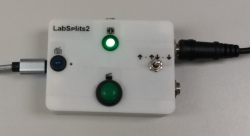
LabSplits is an "electronic stopwatch" for physics teaching labs. Think of it like a stopwatch that a track coach might use, except that the times (or "splits", in track lingo) are triggered by a photogate or other electronic sensor trigger (instead of by the coach pushing a button on the watch), and those splits are typed into a computer (instead of being displayed on the watch's dial or screen). Students then analyze these times using software of their (or your) choice. [LabSplits looks like a generic USB keyboard to your computer, so any app that lets you type numbers into it will work with LabSplits. Most commonly, LabSplits is used with a spreadsheet app such as Excel or Google Sheets.] LabSplits is intended to be a minimalist alternative to commercial lab interfaces: the philosophy is that students should start with the data actually being collected—rather than having much of the physics done for them—while still benefitting from the speed, precision, and capacity of computerized measurements. (Plus, it's cheaper.) The only catch? You have to build it yourself.
Well, if you have plenty of money, not much time, and not much interest in customizing your physics labs, then you probably shouldn't; there are some perfectly good pre-fab lab interfaces available from Pasco, Vernier, and others. But in exchange for your time and effort in building LabSplits:
Note: LabSplits is not very hard to build, but if you have no experience with constructing electronic circuits (in actual enclosures; not just on breadboards), this probably is not the one to start with. There is a small amount of soldering involved (or maybe a large amount, if you don't use my mini-breadboard construction technique); you will have to read a schematic diagram and source your components from it; and you will have to construct it sturdily enough to withstand handling in a typical undergraduate lab. In short: please do try building one, but leave yourself plenty of time.
LabSplits is built around the Arduino Micro microcontroller. You can use any construction technique you like, following this schematic diagram. I prefer to attach a mini (170 pin) breadboard to the bottom of the case—it's just the right size for the Micro—and use point-to-point wiring for the support components. I solder the wires from the support components onto short sections of header strip, which I then insert into the breadboard (instead of inserting each wire into the breadboard separately); I find that it makes the "rat's nest" of wiring much more manageable. I designed a custom case to put everything in; here are the 3-D print files, (both .scad and .stl). (But a generic project case should work fine, too… and if you don't use comonenents with the exact same dimensions that I do, you will have to modify it anyway.) Here, here, and here are some pictures of the inside of the lid during construction, showing the header use. (Sorry—no step-by-step construction guide.)
Once a unit is built, I recommend that you test your wiring by loading this hardware test code (or "sketch") on to the Micro. (See the comments at the beginning of the sketch file for how to use it.) After you're sure that your construction is sound, load the LabSplits sketch and you're ready to go! (Once I decided on a layout, I found that it took me just under 3 hours to build and test a unit—not including the time to source the parts and 3-D print the case.)
LabSplits is copyright © 2016–2022 by R. Carey Woodward, Jr. (me) and/or the Board of Regents of the University of Wisconsin, as our interests lie. You are welcome to use LabSplits for personal and eductional purposes, and to redistribute it without charge. (If you modify it, you must clearly indicate your modifications.) You may not sell it, nor sell any part of it, nor sell your services in constructing it, without my express permission. (Contact me at labsplits@thewoodwards.net if you would like such permission.)
LabSplits has gone through two hardware versions and numerous software versions since I built the first unit in summer 2016, but only four versions have formally been released: 1.40, 2.11, 2.20, and 2.50 (the current stable version). Version 1.40 is documented here. Versions 2.xx use the same hardware, but with different sketches (linked above).
This website was last updated in November 2023.
Since conceiving LabSplits, it has been my goal to share it with other teachers, and to measure any improvement in student learning resulting from its use. The major milestones on this road so far are:
At the 2018 winter meeting of the American Association of Physics Teachers (AAPT), I gave a talk and presented a poster on LabSplits, concentrating on its motivation, construction, and use, and comparing it to a commercial lab interface.
At the 2018 annual meeting of the Wisconsin Association of Physics Teachers (WAPT), I gave a workshop on LabSplits; participants tried it out in a typical introductory physics lab.
I was named a Wisconsin Teaching Scholar for the 2018-2019 academic year, and given support to conduct a study on the effect of LabSplits on student learning (as compared to a commercial interface).
At the 2019 winter meeting of the AAPT, I gave a talk on the preliminary results of this study.
I presented the results more fully in a poster at 2019 Spring Conference on Teaching & Learning of the Office of Professional and Instructional Development (OPID) of the Uninversity of Wisconsin System, and at the PhysTEC 2020 conference.
The study gave an indication of some improvement, but was statistically inconclusive. Future studies were rendered impractical by low physics lab enrollments at my institution.
I retired in July 2023, and am therefore no longer actively developing LabSplits; however, I would be happy to assist anyone interested in taking this project further. Please feel free to contact me at labsplits@thewoodwards.net.